Getting started
Please read this documentation form top to bottom. It is created as a step by step guide to achieve a proper vouchstar integration.
TL;DR
Activate your partner account in vouchstar. Build redirect buttons and voucher code input on your partners website. Check voucher validation before buying on the partners website by sending a validation request to vouchstar API when a voucher has been placed in the input on partners website. When user finishes transaction on partners website, partners server should send voucher code activation request to vouchstar API.
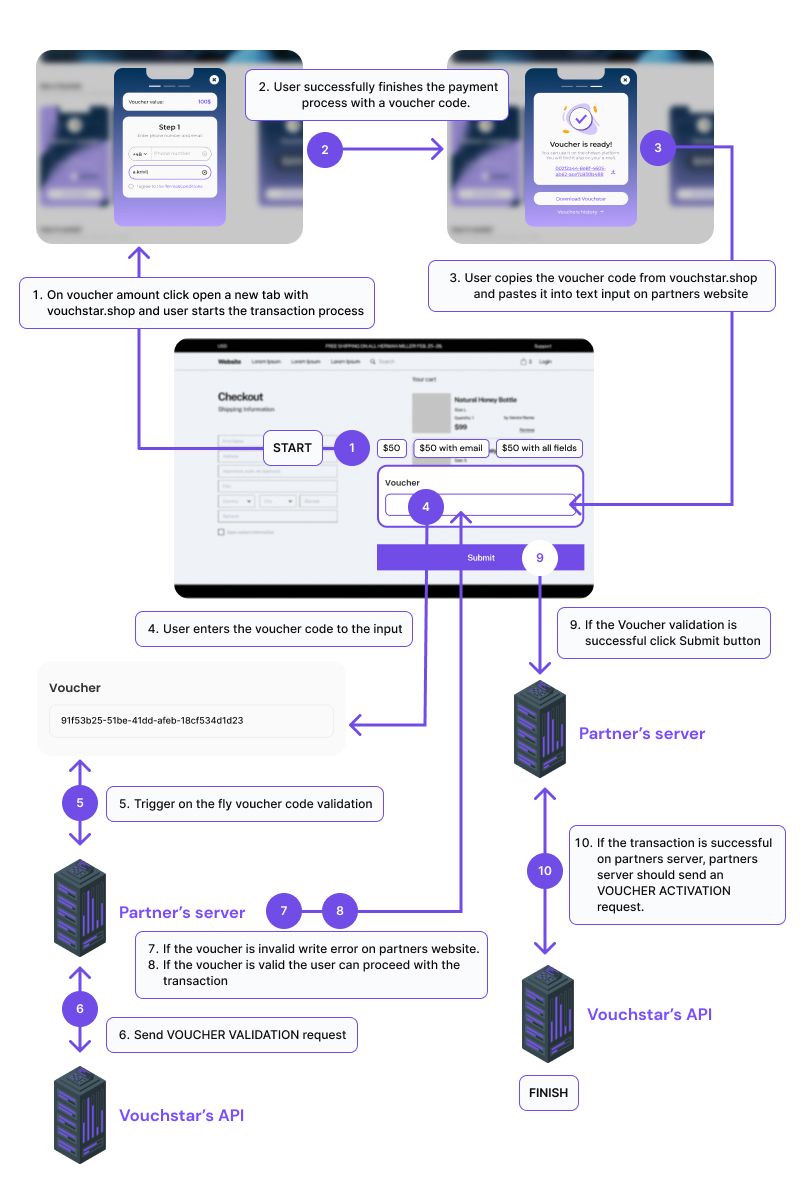
Big picture
Vouchstar voucher codes are very similar to normal discount codes. In this documentation discount codes will be used as an example for better understanding.
- Create and activate your partners account to have full API access (go through Steps for partner steps from no 1-3.)
- Create redirect buttons on your website for the user to buy a voucher by placing proper redirect buttons (as seen in Steps with code to create on partners website step no 4.).
Example: Redirect the user to get a discount code from another website. - Create text input to retrieve voucher code from user on your website to be able to validate voucher before finilizing the transaction (as seen in Steps with code to create on partners website step no 5.)
Example: Create an input to create availability for the user to place a discount code. - Your website on the server side should send a validation request after the voucher code has been placed in the text input. Validate the input with vouchstar API to check if the voucher code is valid (as seen in Steps for partner server communications no 6.).
Example: The discount code should be checked if is valid and can be used in this transaction. - When voucher is valid and user submits the order on your website, partners server should send a voucher activate request (as seen in Steps for partner server communications no 7.). This step will change the status of the voucher in vocuhstar and finalize the transaction for partner and vocuhstar.
Example: When transaction has been submited the server should activate the discount code for the transaction.
your website- work to be done on partners website
Steps for partner
1. Talk to Vouchstar staff
First you need to be added to the Vouchstar system. In order to do that you should send a request to our staff at Contact Us
2. Email invitation
If your account has been added to the Vouchstar system you will receive an Email invitation
3. Account activation
Next you need to activate your account and add a password to it. Thanks to that your account and api connection status will be activated. For more details head on to Access token
Steps with code to create on partners website
4. Price buttons on partners page
To make a proper redirection to the Vouchstar ordering page you need to create link with specified parameters. To see how to do that and more head on to Price buttons
5. Voucher code input on partners page
Create a text input on your website. When input is filled you should send a server request to check the Validate a voucher before creating the transaction.
Steps for partner server communications
6. Voucher validation
When a client has their voucher and would like to use it on partners page, first the voucher should be validated. More detail of to how to Validate a voucher
7. Voucher activation
If user submits the order in partners website, partner should send a Activate a voucher request to vouchstar API. This will make the voucher set as USED.
✨ Well done! You have completed the documentation. If you have any more questions Contact us